
You flip the switch, press the button, or turn the knob. Your Honeywell space heater powers on, the light comes up, but no heat follows. Maybe it shuts off seconds later. Or worse, it won’t turn on at all. If your Honeywell space heater is not working, you’re not alone. Thousands of users face sudden shutdowns, flashing error codes, or silent failures every winter.
The good news? Most issues have simple fixes if you know where to look. This guide walks you through every possible cause, from a tripped circuit breaker to internal fuse failure. You will learn how to reset safety sensors, diagnose a blown thermal fuse, and clean airflow blockages, all without calling a technician.
Test Power Source First
Before opening the unit or suspecting internal damage, confirm the problem isn’t external. Many “dead” heaters are simply not receiving power.
Check Outlet and Circuit Breaker
Plug a working device, like a lamp or phone charger, into the same outlet. If it doesn’t power on, the issue is the outlet or circuit. Head to your electrical panel and look for a tripped breaker. Reset it by switching it fully off, then back on. High-wattage space heaters (750–1500W) often trip breakers when sharing a circuit with other appliances like microwaves or hair dryers.
Pro Tip: Avoid using power strips or extension cords. Honeywell explicitly warns against them. These can overheat and cut power, creating a fire hazard.
Inspect Cord and Wall Plug
Look for frayed wires, bent prongs, or burn marks on the plug. If the cord is damaged, do not attempt a DIY repair. Replace it professionally or retire the unit. For models with detachable power cords (like the HZ445RD1), ensure the internal connection is fully seated. A loose plug at the base can mimic total power failure.
Reset Safety Systems Properly
Honeywell heaters have multiple safety features that can shut them down, even if nothing seems wrong. A proper reset clears false triggers.
Perform 20-Minute Power Reset
This is the most effective first fix for unexplained shutdowns:
- Unplug the heater completely.
- Wait 20 minutes to allow thermal sensors and motion detectors to fully reset.
- Plug directly into a wall outlet (no extension cords).
- Turn on and set thermostat to maximum.
This reset clears:
– Overheat protection
– Tip-over switch
– Motion sensor (on models like HCE 323/33)
Why 20 minutes? Shorter waits may not fully reset internal sensors. Some units need this full cooldown to re-engage.
Decode the “Flashing 88” Error
A flashing “88” on the digital display means overheat protection triggered. The heater shut itself off to prevent fire.
Clear Airflow Blockages
Restricted airflow is the leading cause. Dust, furniture, or curtains too close can trap heat inside.
Do this:
– Move the heater at least 3 feet from walls, furniture, and bedding.
– Check front, rear, and side vents for dust buildup.
– Clean filter every 2–3 months with a dry, soft brush.
Never use water, sprays, or chemical cleaners. Moisture can damage internal electronics.
Allow Full Cool Down
After overheating, the unit must cool for 30 minutes before restarting. Even after a reset, residual heat can prevent restart.
Place on a level, hard surface. Uneven floors can activate the tip-over switch, blocking operation even after cooling.
Diagnose Silent Failures (Light On, No Heat)
If the power light is on but there’s no fan noise or heat, the issue is internal, but not always fatal.
Check Internal Safety Contacts
On models like the HZ445RD1, a pair of spring-loaded electrical contacts can disconnect due to vibration or impact. These break the circuit to the fan and heating element, but the display may still light up.
Fix:
1. Unplug and wait 30 minutes.
2. Remove base screws (often security Torx bits required).
3. Open the back panel carefully.
4. Locate two small metal contacts near the base.
5. Use a non-conductive tool (plastic spudger) to gently push them back into place.
This simple reseating often restores function instantly.
Test the Thermal Cutoff Fuse
This one-time-use fuse blows when the unit overheats repeatedly. Once blown, it cuts all power to the heating element.
How to check:
– Locate the white or black cylindrical fuse near the heating element.
– Use a multimeter to test for continuity.
– If no continuity, the fuse is blown.
Replacement: Use only OEM Honeywell thermal fuses. Some models have soldered fuses, and replacing them requires soldering skills. If inaccessible, replacement is safer than repair.
Verify Thermostat and Controls
A misconfigured or faulty thermostat can make the heater appear dead, even when powered.
Set Thermostat to Maximum
The heater only runs if room temperature is below the set point. If the thermostat is set too low, it won’t activate, even if the room feels cold.
Fix: Turn the dial fully clockwise to the highest setting. Wait 1–2 minutes. If heat starts, the thermostat was the issue.
Test Digital Controls
On digital models, touch the buttons. Does the display respond? If yes, but no heat follows, the problem is downstream, likely the heating element, fan, or power contacts.
If buttons don’t respond, the circuit board or power supply may be faulty.
Clean and Maintain for Reliable Operation
Dust buildup causes a majority of unexpected shutdowns. A clean heater runs longer and safer.
Monthly Maintenance Routine
- Unplug and cool the unit completely.
- Wipe exterior with a dry, soft cloth.
- Clean vents using a soft brush or vacuum nozzle.
- Inspect filter and remove and tap out dust.
- Check fan blades and spin by hand to ensure free movement.
Never use water, polish, or sprays. These can seep into electrical components and cause shorts or corrosion.
Diagnose Internal Component Failure

When resets and cleaning don’t work, internal parts may have failed.
Inspect Heating Element and Fan
After disassembly:
– Look at the heating coil. Any visible breaks or warping mean it’s dead.
– Spin the fan blade. If stuck or noisy, the motor may be failing.
Use a multimeter to test the heating element for continuity. No reading equals an open circuit and means replacement.
Check Circuit Board Connections
Look for:
– Burnt spots or melted plastic
– Loose wires or disconnected ribbons
– Corrosion or dust buildup
Reconnect loose wires. If the board is damaged, replacement is usually more cost-effective than repair.
Decide: Repair or Replace?
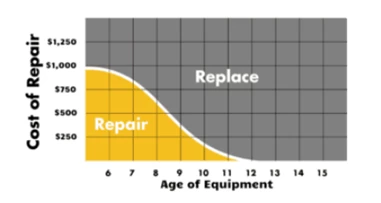
For heaters over one year old, repair often isn’t worth it.
When to Replace
- Thermal fuse is soldered and inaccessible
- Heating element or fan motor is dead
- Circuit board is damaged
- Unit has frequent intermittent operation
New Honeywell heaters start around $50–$80. Labor and parts can exceed that. Plus, older units lose efficiency and safety over time.
Warranty Claim Option
Honeywell offers a 3-year limited warranty on most models. If your heater is under warranty and failed due to defect (not misuse), contact customer service. They may send a replacement.
Do not disassemble a unit under warranty because it can void coverage.
Prevent Future Failures
Avoid repeat issues with smart habits.
Ensure Proper Placement
- Always on a flat, hard surface
- 3 feet clear from flammable materials
- Never on carpet, rugs, or near curtains
Use Dedicated Circuit
Plug into an outlet used only for the heater. Avoid sharing with TVs, microwaves, or other high-draw devices.
Schedule Cleanings
Set calendar reminders every 2 months during heating season. A 5-minute clean prevents most failures.
Frequently Asked Questions About Honeywell Space Heater Problems
Why does my Honeywell space heater keep shutting off by itself?
Frequent shutdowns usually mean overheat protection is triggering. Check for blocked vents, dust buildup, or placement too close to furniture. Clean the filter and ensure 3 feet of clearance on all sides.
What does a flashing “88” mean on a Honeywell heater?
A flashing “88” indicates the high-temperature safety control has been activated. Unplug the unit, clear any airflow blockages, and let it cool for at least 30 minutes before restarting on a level surface.
Can I use an extension cord with my Honeywell space heater?
No. Honeywell explicitly prohibits extension cords and power strips. The high wattage can overload standard cords and create a fire hazard. Always plug directly into a wall outlet.
How do I reset my Honeywell space heater?
Unplug the heater for 20 minutes, then plug it directly into a wall outlet and turn it on with the thermostat set to maximum. This clears most safety triggers including overheat, tip-over, and motion sensor lockouts.
Is it worth repairing an older Honeywell space heater?
For units over one year old, repair is often not cost-effective. Replacement parts and labor can exceed the cost of a new unit. If the thermal fuse is soldered or the circuit board is damaged, replacement is the safer choice.
Why is the light on but no heat coming out?
This typically points to a disconnected internal safety contact or a blown thermal fuse. On models like the HZ445RD1, reseating the spring-loaded contacts near the base often restores function. If the thermal fuse has blown, it must be replaced.
Final Checklist: Get Your Honeywell Heater Working Again
Most Honeywell space heater problems resolve with basic troubleshooting. Start by testing the power source and performing a 20-minute reset, since the majority of issues clear up at this stage. If internal repair becomes necessary, proceed only if you have experience with electrical work.
When your unit is over a year old or shows signs of internal damage, replacing it is often safer and more economical than repairing it. Safety and reliability matter more than saving a few dollars.